When editing is paused
Sometimes Wigoh works on your site's editing copy itself. Your own edits would clash with that work, so the editor pauses editing until it is done. This happens at three moments:
- After a purchase, while Wigoh builds the rest of your site's pages in the background.
- While your site goes live for the first time.
- While Wigoh publishes your changes to the live site.
What is paused
- The AI chat. The message box cannot be used. It reads Editing is paused while we build the rest of your site., Editing is paused while your site goes live. or Editing is paused while we publish your changes.
- Undo and Redo.
- Edit, the button that opens Elementor.
- The Code tab.
- Save SEO Settings in a page's SEO settings.
- The WordPress admin of the editing copy. It is closed until the work is done.
Pointing at Edit or Code shows Editing is paused until the work on your site is done. The chat opens again when the work ends.
What the preview area shows
The preview area shows the progress instead of your site.
While the rest of the site builds
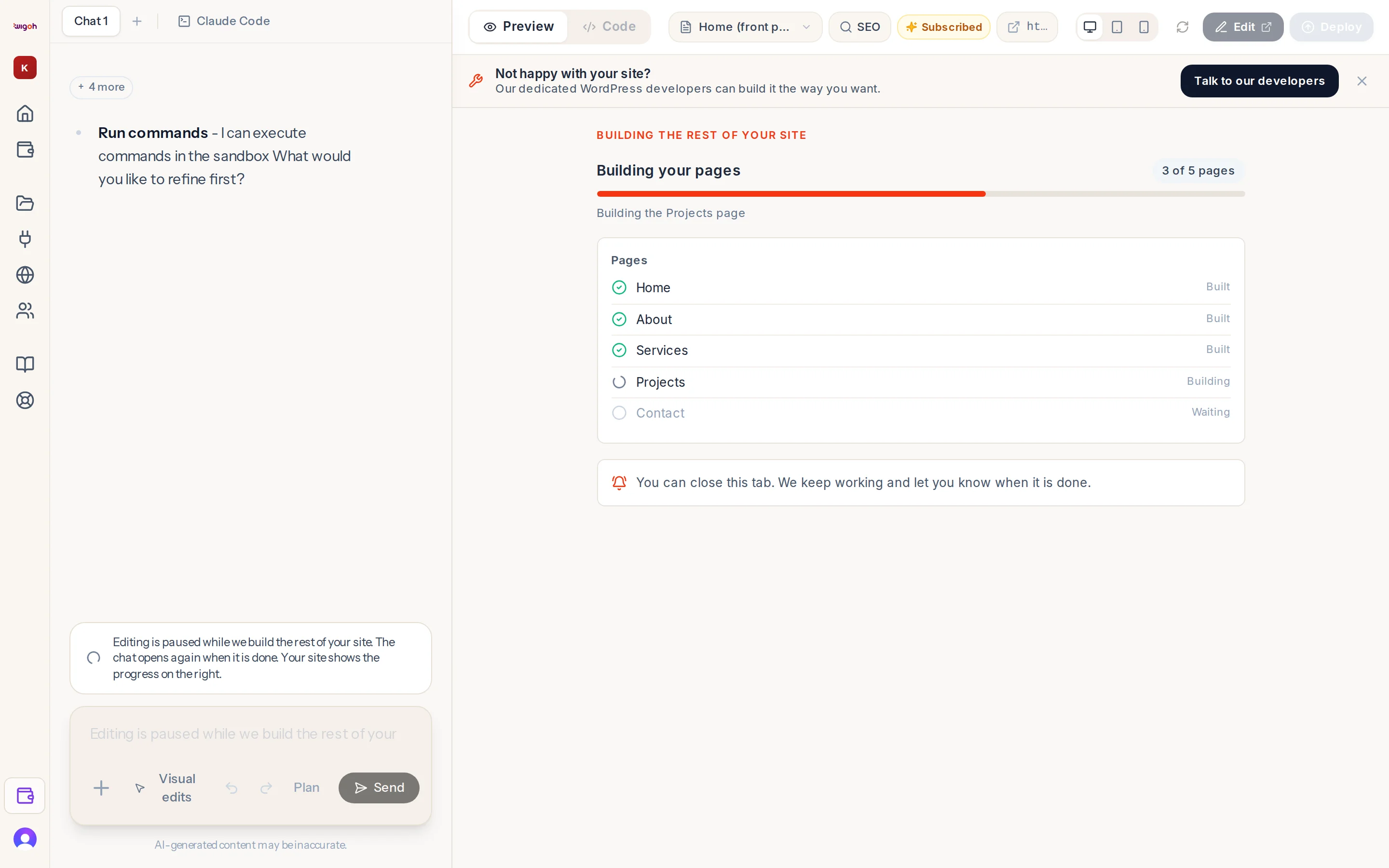
The panel is titled Building the rest of your site. It shows:
- How many pages are done out of the total: [done] of [total] pages.
- Each page with its status: Waiting, Building, Built or Not built.
- Any entries saved: [saved] of [total] entries saved.
When the build finishes, editing opens again and you see Your site is ready to review. Deploy it when you are happy with it.
If the build fails, the panel reads Building the rest of your site did not finish and offers Build the rest of the site to try again. See After payment.
While your site goes live
The panel is titled Putting your site live and lists the steps as they happen. When it is done it says Your site is live. See Deployment progress.
While your changes publish
The panel is titled Publishing your changes and lists the steps. When it is done it says Your changes are live. See Publish your changes.
You can close the tab
The panel reads You can close this tab. We keep working and let you know when it is done. The work continues without the tab. You get a notification when it finishes. Open the project again from All projects to carry on editing.